Chrome Video Downloader
The M3U8to extension detects m3u8 & HLS streams on any page and saves them as MP4 — one click, right in your browser. The same local, no-upload engine as our web tools.

“Download M3U8 and HLS stream videos as you browse. Preview and merge to MP4 in your browser — no external sites, no ads.”
From page to MP4 in three clicks
No DevTools, no copy-pasting URLs — the extension finds the stream for you.
Install and pin M3U8to
Add it from the Chrome Web Store (works in Chrome, Edge and other Chromium browsers), then pin it from the puzzle-piece menu so it's always one click away.
Open the page and click the icon
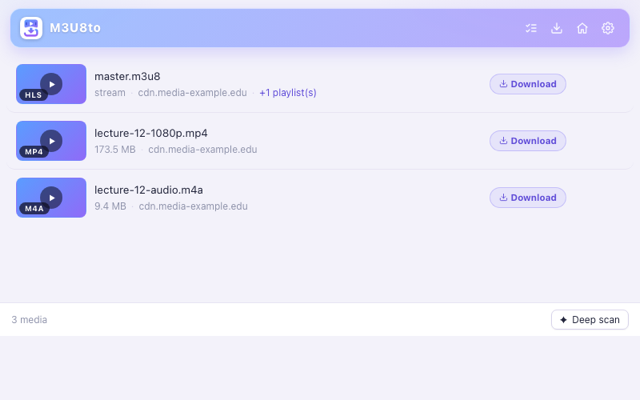
Play the video on its page. The popup lists every stream it detected — the playlist, its segments and the available quality levels.
Download the merged MP4
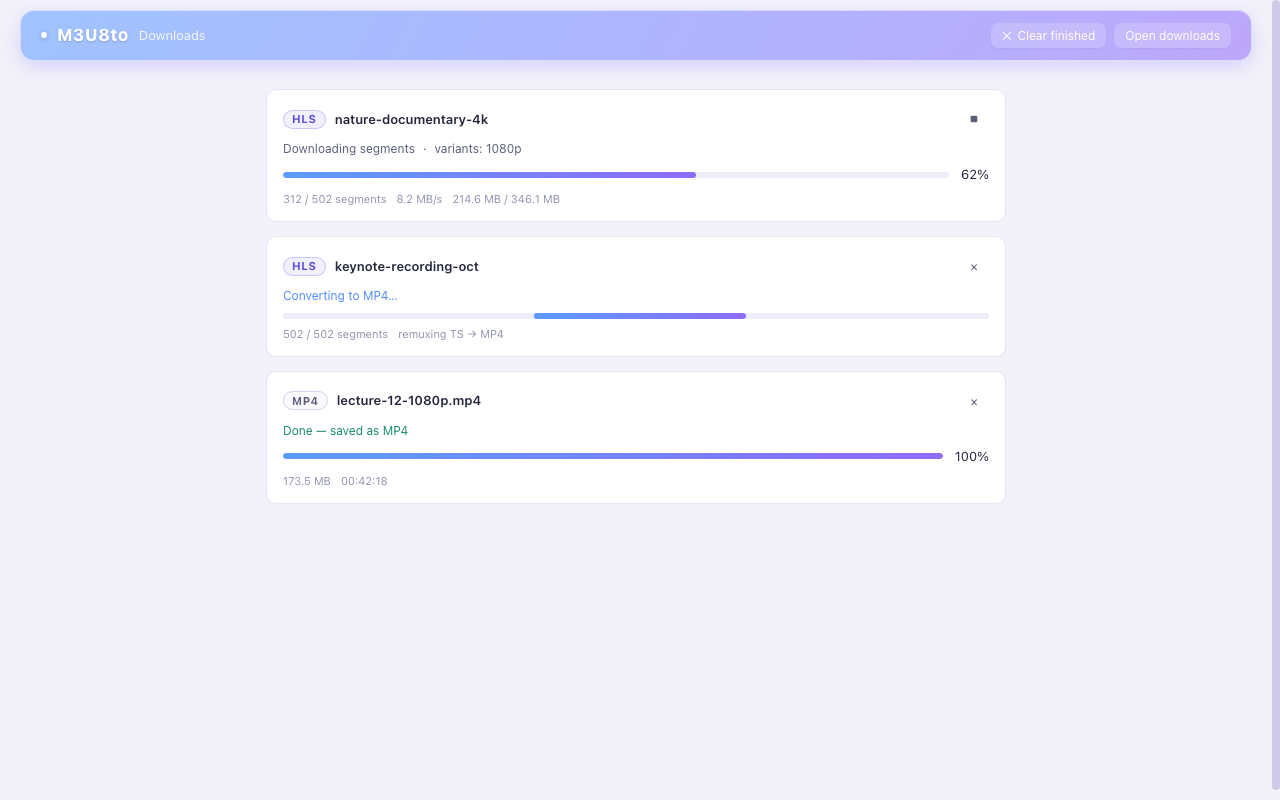
Press download and the extension fetches all segments locally and merges them — the finished MP4 lands in your browser's downloads folder.
What the extension does
Everything the web tools do — a Chrome video downloader that stays one click from the video.
Automatic stream detection
Local merge to MP4
Handles the hard cases
No ads, no tracking of your videos
Permissions and privacy
The extension needs page access to detect the streams a page plays and to fetch their segments in the page's context — that access is the whole point of a Chrome video downloader, and it's also the boundary: the extension does not transmit your browsing data or your videos anywhere. Segments flow from the stream's own CDN into your browser and out to your disk as one MP4.
We keep the same rule as the web tools: we can't see what you download, and we couldn't store it even if we wanted to. Please download only content you have the right to save, and respect each website's terms of service.
Don't want to install anything?
The web tools do the same job with nothing more than a link.
M3U8 to MP4 Converter
M3U8 Player
Stream Video Downloader
Chrome video downloader FAQ
Before you add it to the toolbar.
Is the M3U8to Chrome extension free?
Yes — free to install and use, with no account, no watermark, no ads, and no “pro” tier gating the core features. Detect streams, download them, merge to MP4: all included. The web tools on m3u8to.com are free under the same philosophy.
Is this Chrome video downloader safe?
The extension requests only the permissions it needs to detect and fetch streams on the pages you visit, and all processing happens locally in your browser — the same no-upload architecture as the web tools. It contains no ads, no bundled software, and no external upload step: your video travels from the source CDN to your downloads folder without touching our servers.
Does it work in Microsoft Edge or Brave?
Yes. Edge, Brave, Opera and other Chromium-based browsers install Chrome Web Store extensions directly — search the store from your browser or click Add to Chrome and confirm. Firefox uses a different extension format; a Firefox build is planned but not available yet. In the meantime, Firefox users can use all the web tools on this site.
When should I use the extension instead of the web converter?
Use the extension when the stream is hard to reach: pages that only start the m3u8 request after playback, AES-128-encrypted playlists, sites that block cross-origin (CORS) access, or live broadcasts you want to record while they air. For a link you already have, the web converter is faster — no install at all.
Can it download from Netflix, Disney+, or other DRM services?
No. DRM-protected platforms (Widevine, FairPlay, PlayReady) encrypt their video with keys released only to licensed players, and this extension does not bypass them — nor does any legitimate tool. It is built for plain HLS/m3u8 streams that you have the right to save, and we ask you to respect each site's terms of service.
How do I pin the extension so it's always visible?
After installing, click the puzzle-piece icon in Chrome's toolbar, find M3U8to in the list, and click the pin icon. The M3U8to icon then stays in the toolbar — one click on any page shows the streams it detected.